Remote Construction Monitoring: Practical Guide
Which tools to use for remote construction monitoring, what you can verify off site and what still needs a site walk, plus a weekly routine.
AI-generated images
Remote construction monitoring takes two kinds of tool. A field management app handles daily reports, issues and pay items (Procore, PlanRadar, Fieldwire or Archireport). A visual platform shows you the jobsite through cameras, time-lapse, drones, 360 photos or BIM. The first records what someone says happened. The second shows you what happened.
What is remote construction monitoring?
Remote construction monitoring: tracking progress, schedule, visible quality and issues on a construction project without being physically on site, using field records and date-stamped images. Owners, owner's reps, lenders and GCs with several jobsites use it to stay on top of work they cannot walk every day.
It does not replace site walks. It changes what they are for. You stop going to the jobsite to find out what is happening, and start going to act on what you have already seen from the office.
Which app should you use to monitor a construction project?
The short answer is that there are two families of apps, and most projects with people off site need one of each. Lumping them into a single "best apps" list is why so many comparisons confuse more than they help.
Field documentation | Visual monitoring | |
|---|---|---|
What it records | Daily reports, issues, inspections, punch lists, documents | Date-stamped images and video of the jobsite |
Who feeds it | People on site, on phone or tablet | Fixed cameras, drone flights, 360 captures |
Answers | What was done and who signed it off? | What does the jobsite actually look like today? |
Weak spot | Only as good as the person filling it in | Does not replace a close-up inspection |
Examples | Procore, PlanRadar, Fieldwire, Archireport | Jobsite cameras, time-lapse, drone, 360, BIM |
Field documentation tools
These are the construction management apps crews and superintendents use in the field. Here is how they describe themselves (checked October 2026):
- Procore presents itself as construction management software, and its quality and safety tools bring daily logs, inspections and incidents together.
- PlanRadar calls itself a construction and real estate platform, with site documentation and reporting plus defect management and snagging.
- Fieldwire describes itself as a field-first tool for the jobsite: tasks, punch lists and inspections on plans, with scheduled PDF reports.
- Archireport presents itself as a site management app for architects and general contractors, covering snags, remarks, reports and documents.
Pick between them based on project size, who will enter the data and what you need to certify. They share one condition: information exists only if someone on site enters it.
Visual monitoring tools
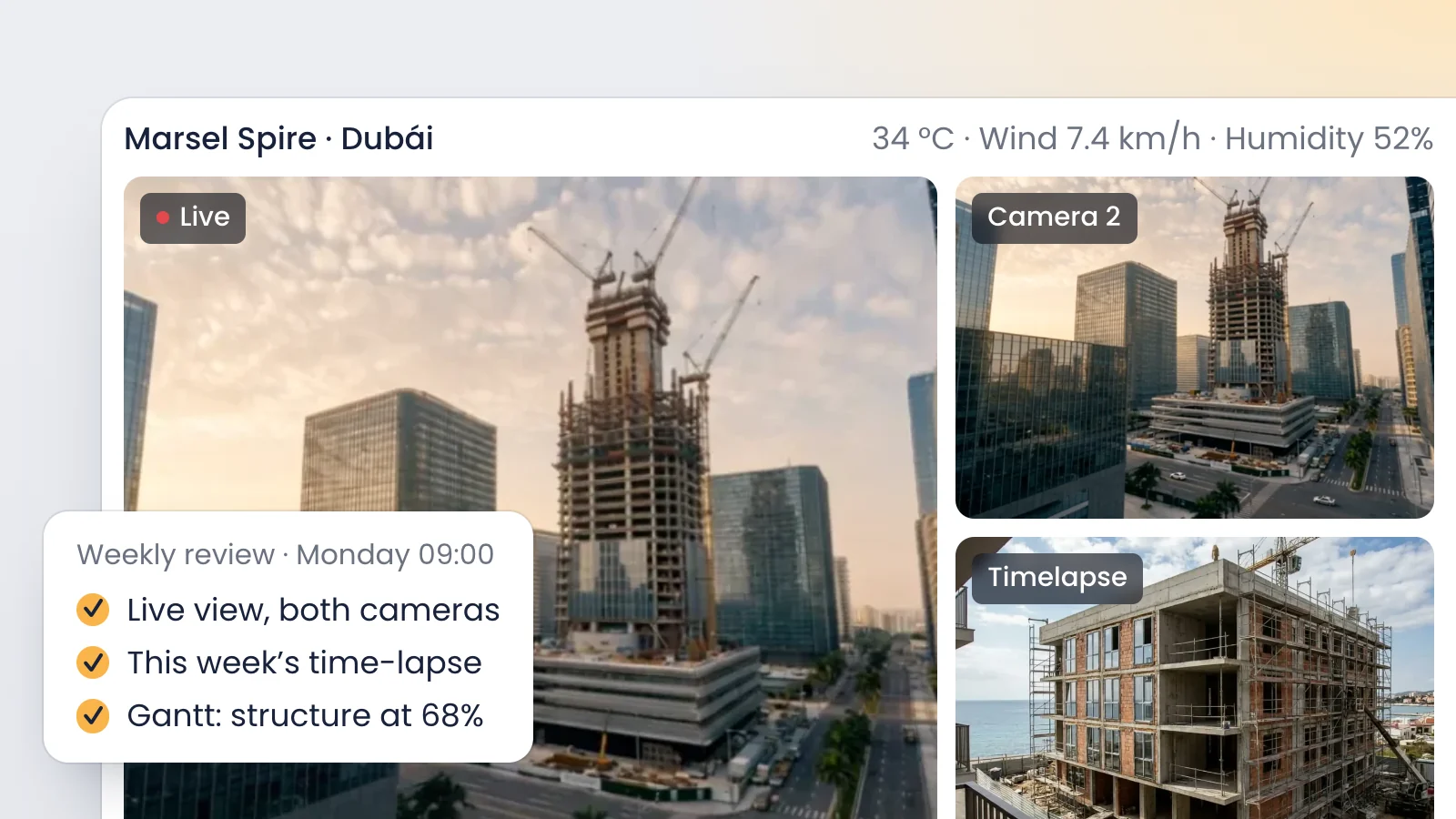
This is where VisionHub fits. It is a visual monitoring and remote management platform for construction projects, infrastructure and assets, and it brings the sources that show you the jobsite into one dashboard:
- Fixed 4G cameras, live: 24/7 live view in the browser with nothing to install, configurable privacy masks and a searchable image history.
- Continuous recording: up to 30 days of HD video, so you can check what happened at a specific time.
- Time-lapse: the visual summary of weeks or months of work.
- Drone and 360 photos: flights and captures carried out by specialist partners and scheduled from the platform.
- BIM: load the IFC model and compare it side by side with the live camera.
Why you need both
A daily report says the third-floor slab was poured. The recording from that day tells you what time the pour started, whether it was raining and how many trucks came in. Neither source is enough alone: the report gives context and a signature, the image gives evidence. So the useful question is not which app to choose, but which gap each one fills on your project.
What you can verify remotely, and what still needs a site walk
Being honest about this list is what makes remote monitoring work. Promise that a camera sees everything, and the first quality problem will sink trust in the whole system.
You can verify remotely | Still needs a site walk |
|---|---|
Overall progress by phase and area | Quality of work that gets covered up, such as rebar or in-wall MEP |
Start and finish of visible activities | Precise measurements and testing |
Equipment and truck movements | Layout and tolerances |
Effect of rain or wind on the jobsite | Coordination meetings with complex decisions |
Laydown areas and housekeeping | Inspections and handovers that require presence |
Rough match between BIM model and as-built | Safety checks that need a close look |
The rule of thumb: use remote monitoring to decide when you need to go and what to look at. A site walk prepared with the week's images is shorter and settles more.
A weekly remote monitoring routine
This routine works for an owner's rep, a developer or a public agency inspector covering several projects. Shift the days to fit your calendar.
- Monday, review last week. Open side-by-side photo comparison between last Monday and today for each camera. Note which activities moved and which did not.
- Monday, check against the schedule. Review the week's tasks in the Gantt chart and compare them with what you just saw. If you import the schedule from XML, you do not have to rebuild it.
- Tuesday, weather. Check the forecast and weather alerts for the week. If high winds are forecast, flag it before a crane lift or curtain wall installation.
- Every day, five minutes of live view. A look at the camera first thing and another mid-afternoon. That is enough to spot a stalled jobsite or a blocked gate.
- Thursday, issues. Cross-check open issues in your field app with the images. If an issue is marked closed, find the photo that proves it.
- Friday, evidence for the report. Download the photo pairs and the alert images for the week. They are the backbone of the monthly progress report.
- Friday, plan the site walk. With all of the above, decide whether you need to be on site next week and what you will check there.
Examples across sectors
Linear projects with several work fronts
On a road, rail spur or pipeline, the problem is not one distant jobsite but several fronts far apart. A 4 km pipeline section with three open fronts can run one 4G camera per front, with no need for a wired connection. The project manager reviews all three from the same dashboard, and continuous recording shows what time equipment reached each front. When a front moves on, the camera moves with it.
Renewable energy plants
On a utility-scale solar project the site is so large that one fixed camera cannot cover pile driving or racking progress. The usual mix is one or two fixed cameras at critical points, such as the substation or laydown yard, plus regular drone flights to see the whole site. Wind alerts matter during module installation, and the alert log with images documents weather stoppages.
Public works
A public agency needs traceability and several people seeing the same thing. Because users per project are unlimited, you can give view-only access to the agency's engineer, the inspection consultant and the program manager without paying per seat. The time-lapse for the period complements the pay application and helps explain the project to the public.
You will find these and other cases on our sectors page, and the approach for each type of team on our pages by role.
Frequently asked questions
Which app should I use to monitor a construction project remotely?
Pair a field documentation app for daily reports, issues and pay items, such as Procore, PlanRadar, Fieldwire or Archireport, with a visual platform that shows you the jobsite in date-stamped images, such as VisionHub with cameras, time-lapse, drone, 360 and BIM. The first records what is reported. The second lets you check it without travelling.
Can you supervise a construction project without visiting it?
You can monitor overall progress, pace, equipment movements, weather impact and housekeeping remotely. Quality of work that will be covered up, precise measurements, testing and handover inspections still need someone on site. Remote monitoring cuts down and prepares site walks. It does not remove them.
Do jobsite cameras need Wi-Fi or power on site?
The cameras used with VisionHub are 4G, so they do not depend on the jobsite network. Installation is handled by specialist partners; confirm the power supply for each location with them. To compare camera types and what each option costs, read our construction camera guide.
How many people can access a project?
VisionHub has unlimited users per project, and everyone signs in from a browser. You set permissions per user and per module: view only, partial editing or full admin. The developer, GC, owner's rep and lender all see the same jobsite with the access level that fits their role.
Conclusion
Remote construction monitoring works when you separate two questions: what has been reported, and what can be seen. A field documentation app answers the first and a visual platform answers the second. With a simple weekly routine, site walks become fewer and better prepared. To see your project in one dashboard, book a VisionHub demo or price it by module on our pricing page.